
Estimate with confidence. Invoice in a click.
JobCostIT turns your real receipts and crew time into calibrated estimates and branded invoices — so the bid that wins the job and the invoice that gets you paid live in one place.
Install JobCostIT to your phone
Add it to your home screen — no App Store needed.


Estimates backed by your real job costs.
Stop guessing at bids. JobCostIT builds estimates from the actual material and labor costs you've already tracked — so every quote is calibrated to what your jobs really cost, not a rule-of-thumb. Line up materials, labor and subs, then send a branded estimate your customer can accept online.
- Estimates calibrated against your historical job costs
- Line items for materials, labor & subcontractors
- Turn any past job into a reusable baseline
- Customers accept the estimate with one click

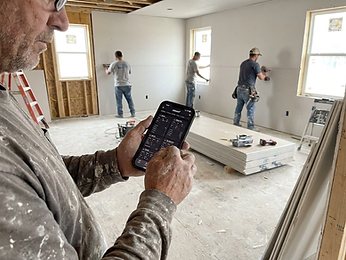
Invoice the job. Get paid your way.
One click turns a job's tracked costs into a clean, branded invoice. Add your own payment instructions — bank, check, Venmo, Zelle, Cash App — plus an optional Pay Now link and scannable QR code. JobCostIT never touches your money; it just gets your customer to the right payment route faster.
- Branded invoices straight from job costs
- Your own bank, check, Venmo, Zelle & Cash App details
- Optional Pay Now link + scannable QR code
- Track outstanding balances at a glance

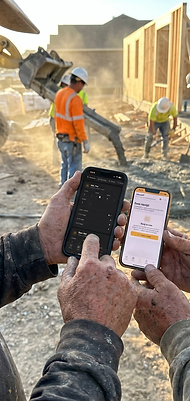
Snap a receipt. The AI does the rest.
Photograph any material receipt right on the job site. Our AI reads the vendor, amount, date and trade category — auto-cropped to the paper so the desk and your hand never pollute the data. Every scanned cost feeds straight back into your estimates and invoices.
- Auto-extracts vendor, total, date & category
- Crops to the receipt — ignores hands, tables & clutter
- Scanned costs flow into estimates & invoices
- Bulk upload multiple receipts at once




Crew clock in with their own login.
No more shared PIN pads or paper timesheets. Each crew member gets an email invite and clocks hours against the exact job they're on. Track unpaid lunch breaks, overtime and double-time your way — then export payroll-ready reports in a click.
- Personal email login for every crew member
- Hours tracked per job, not just per day
- Unpaid lunch, overtime & double-time built in
- Approve timesheets → export payroll instantly

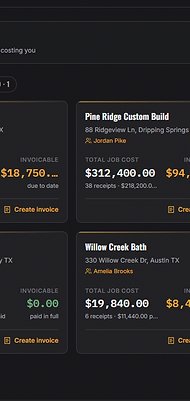
Track every job. No limit, ever.
Run as many active jobs as your crew can handle — JobCostIT never caps your projects. See real-time material and labor costs per job, drop pins and photos on blueprints, and turn any job into a calibrated estimate or branded invoice.
- No cap on active or completed jobs
- Live material + labor cost per job
- Blueprint pins, estimates & invoices all linked
- One dashboard for the whole company
Find subs. Track vendors. Stay covered.
Search for subcontractors by trade and add them to one shared directory — trade, contact, phone, email and address. New vendors auto-file from your scanned receipts, and you can track insurance carrier and COI expiry so a lapsed certificate never holds up a job.
- Find subcontractors by trade and location
- One directory for subs, vendors & suppliers
- Contact info auto-captured from scanned receipts
- Track insurance carrier & COI expiry dates
And more, built in
One app for the office and the field — built dark, fast, and simple.
AI receipt scanning
Snap a photo — we pull vendor, amount, date and category automatically.
Read the guideCrew time clock
Each crew member logs in with their own email. Hours tracked per job, payroll-ready.
Read the guideAI-assisted estimates
Generate estimates calibrated against your own historical job costs.
Read the guideSubs & vendors
Track COI expiry dates and trade contacts in one directory.
Blueprint pins
Drop notes and photos right on the floor plan where the work happens.
Invoice customers & get paid your way
Send branded invoices with your own payment instructions — bank, check, Venmo, Zelle and more — plus an optional Pay Now link and a scannable QR code. You keep your own money route — JobCostIT never touches your funds. Invoicing is part of JobCostIT Pro.
Simple pricing
Two plans. Whole company. Cancel anytime.
Start free for 14 days, then pick a plan.
Everything to run the job & track costs.
- 100 AI receipt scans / mo
- Unlimited jobs — no cap
- Job cost & material tracking
- Crew time clock + payroll export
- AI-assisted estimates
- Subs & vendors directory
- Blueprint annotations
Starter + invoicing, payment links & 400 AI scans / mo.
- 400 AI receipt scans / mo
- Unlimited jobs — no cap
- Unlimited AI-assisted estimates
- Customer invoicing & payment instructions
- Payment links & QR codes
- Everything in Starter
Includes invoicing & payment links
Secure checkout · Cancel anytime
Estimate it. Invoice it. Get paid.
Start free for 14 days. Build estimates from your real costs, send branded invoices, and track every dollar — no card required.